
Does Single-Button Assistant work with ElvUI?
Yes. The current Tukui ElvUI page explicitly lists support for One Button Assist and Assisted Highlight. The assistant is a Blizzard gameplay feature, while ElvUI supplies the replacement action bars that display its spell and highlights. You do not need a separate plugin just to place the assistant on a current ElvUI bar.
The useful distinction is that ElvUI does not create the suggested rotation. World of Warcraft chooses the recommended ability, applies the global cooldown penalty defined by Blizzard, and exposes the assistant spell or highlight. ElvUI's job is to render that state on its action-bar buttons. This is why a frozen icon can come from the game feature, ElvUI, another bar addon, a stale installation or a temporary combat-state restriction.
- Use the current ElvUI package before troubleshooting an old compatibility report.
- Test the generated assistant button on a normal visible ElvUI action bar.
- Keep Assisted Highlight separate in your mind: it highlights suggested abilities across the bar instead of combining the sequence into one spell.
- Treat the feature as learning and accessibility assistance, not as a guarantee of optimal damage, healing or tank decisions.
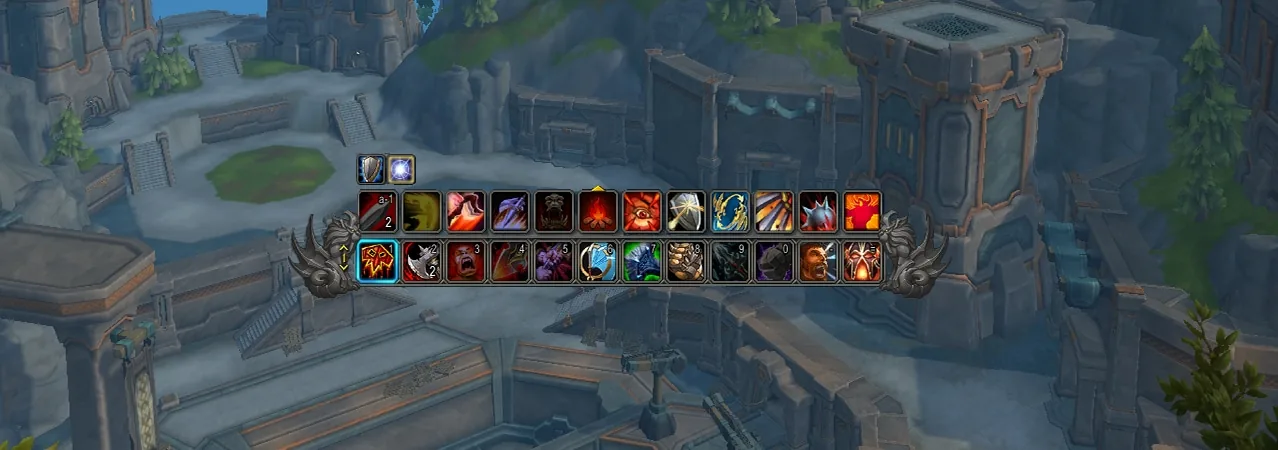
Enable Single-Button Assistant in World of Warcraft
Start with Blizzard's own interface controls, not the ElvUI configuration window. Open the game menu, choose Options, then use the search field for Single-Button Assistant, Combat Assistant or Assisted Highlight. The exact grouping can move between major game patches, but the search field is more reliable than following an old screenshot path word for word.
Select View in Spellbook for Single-Button Assistant. World of Warcraft opens the Spellbook location that contains the generated assistant spell for your current specialization. If you only want normal spells to glow when suggested, enable Assisted Highlight instead. You may use both while learning, but testing one at a time makes troubleshooting much easier.
- 1
Update ElvUI and reload
Install ElvUI 15.26 or a newer verified release if Tukui publishes one, then run
/reloadafter login. - 2
Open Gameplay Enhancements
In WoW Options, search for Single-Button Assistant rather than relying on an expansion-specific menu path.
- 3
Choose the assistance mode
Open the assistant in the Spellbook for one-button use, or enable Assisted Highlight for per-ability recommendations.
- 4
Test outside combat
Configure and move the button before combat, because WoW protects action-bar changes while combat lockdown is active.
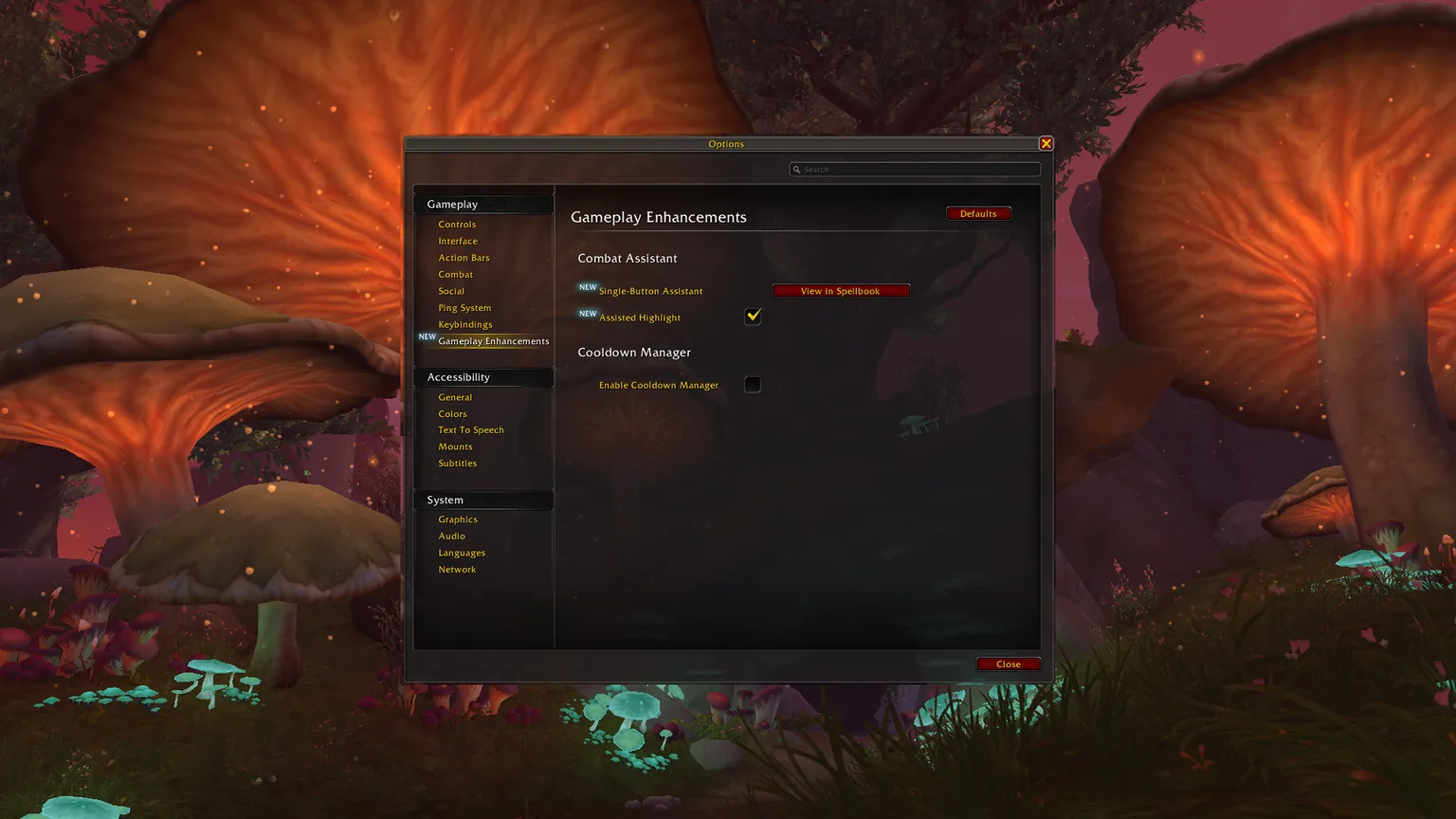
Put the assistant on an ElvUI action bar
After selecting View in Spellbook, locate the Single-Button Assistant entry for the active specialization. Drag it to an unlocked, visible ElvUI action bar slot just as you would drag a normal spell. Lock the bars again after placement so the button cannot be moved accidentally during play.
If dragging does nothing, leave combat, disable ElvUI's action-bar keybind mode, and confirm the destination bar is enabled under ElvUI → ActionBars. Also check that the bar is not hidden by a mouseover or visibility rule. The assistant is specialization-sensitive, so confirm the active specialization and bar page before assuming the button was deleted.
- Place the assistant on a primary bar that remains visible during combat.
- Avoid a slot that is replaced by stealth, form, stance, vehicle or override-bar paging unless that behavior is intentional.
- Bind one comfortable key and verify that the binding appears on the ElvUI button.
- Repeat the placement for another specialization if its action-bar layout is separate.
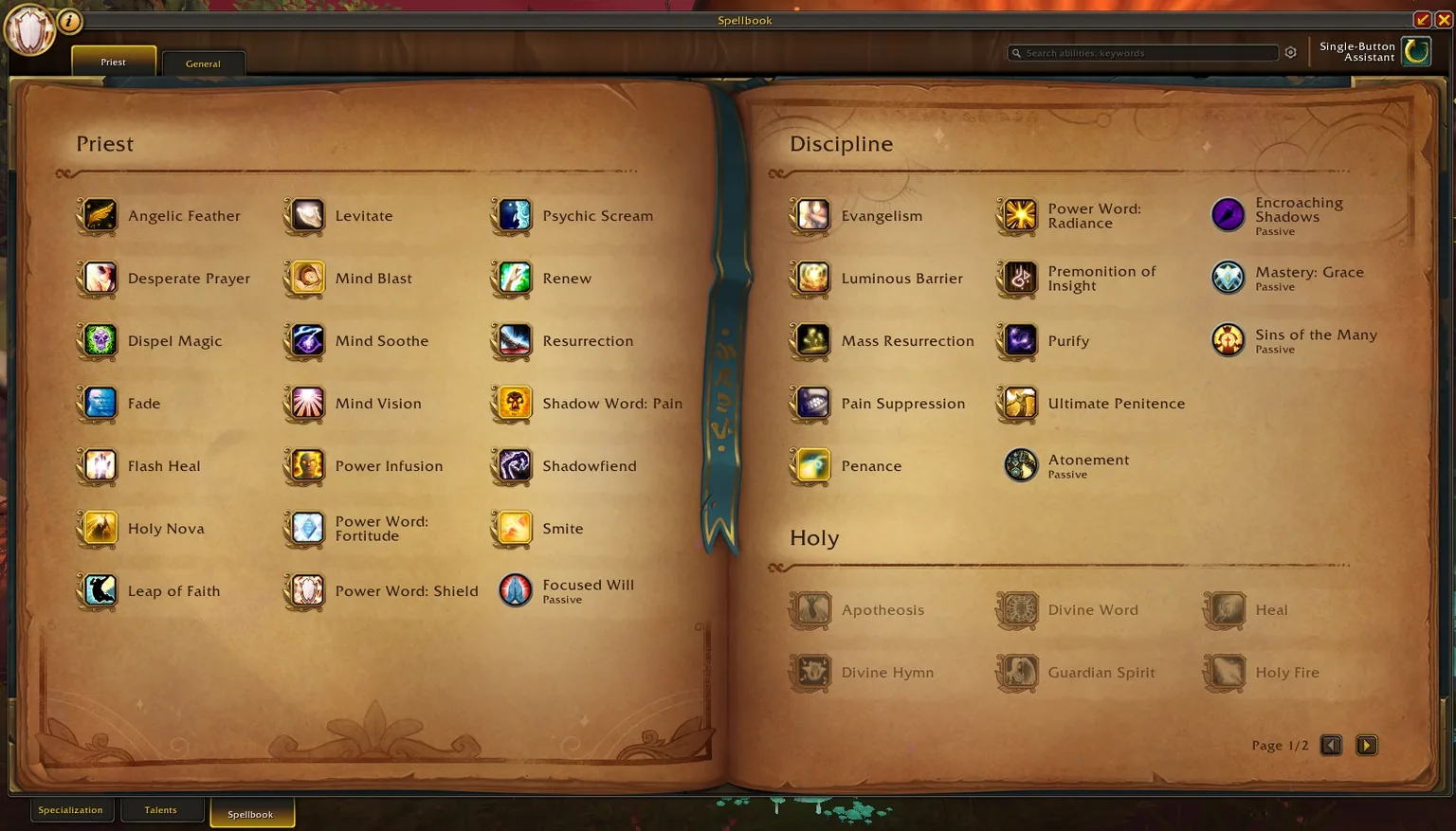
Single-Button Assistant versus Assisted Highlight
Both features use Blizzard's combat-assistance system, but they solve different problems. Single-Button Assistant gives you one generated action that advances through recommendations with an added global-cooldown cost. Assisted Highlight keeps your normal action bars and marks the spell Blizzard recommends next. For players who want to learn key locations, Assisted Highlight is usually the better bridge. For players who need fewer inputs, Single-Button Assistant is simpler.
| Option | What appears on ElvUI | Best fit | Main limitation |
|---|---|---|---|
| Single-Button Assistant | One generated button whose icon changes | Reduced input complexity and rotation practice | Added cooldown penalty and limited situational judgment |
| Assisted Highlight | Glow or highlight on existing abilities | Learning a rotation while keeping normal keybinds | You still press different keys and must read the bar |
| Normal ElvUI bars | Your configured spells without assistant cues | Experienced play and full control | No built-in rotation recommendation |
Fix a missing, frozen or erroring assistant button
Do not begin by deleting the WTF folder. That removes far more settings than this test requires. First update ElvUI, reload the interface, move the button to a simple always-visible bar and reproduce the problem on a training dummy. Then test with other action-bar, rotation-helper and skinning addons disabled. If the problem disappears, re-enable addons in small groups until the conflict returns.
For Lua errors, use ElvUI's debug mode only long enough to isolate the problem: enter /edebug on, reload, and test the same action. Debug mode disables many third-party interactions. Exit it after the check with /edebug off. Copy the first complete error and its addon path; repeated follow-on errors are often symptoms rather than the cause.
| Symptom | Likely cause | First safe check |
|---|---|---|
| Assistant is missing from the Spellbook | Feature unavailable for the current state, spec or client build | Search WoW Options again and verify the active specialization |
| Button exists but is not visible | Hidden ElvUI bar, paging or visibility condition | Move it to Bar 1 and set that bar to always visible out of combat |
| Icon does not change | Stale UI state, unsupported encounter state or addon conflict | Run /reload, test on a dummy and disable other bar/rotation addons |
| Highlighted spells do not glow | Assisted Highlight is off or another skin modifies button overlays | Enable only Assisted Highlight and test with third-party skins disabled |
| Lua error references ActionBars | Old ElvUI files, mixed versions or plugin hook | Replace all three ElvUI folders with one clean current release |
| Key activates the wrong slot | Action paging, override bar or conflicting binding | Check ElvUI bind mode and WoW Key Bindings for duplicates |
What the assistant cannot decide for you
A recommended rotation button cannot understand every mechanic, target priority, movement requirement, defensive timing, interrupt assignment or healing emergency. Blizzard deliberately positions the feature as assistance, and its added global-cooldown penalty means it is not intended to replace a fully learned rotation in performance-focused play.
Use it to learn the basic rhythm of an unfamiliar specialization, reduce input complexity or check whether your normal priority has drifted. Keep interrupts, defensives, movement abilities, crowd control and encounter-specific utility on separate reliable binds. As confidence grows, Assisted Highlight can help you transition from one generated button to your normal ElvUI layout.
- Keep interrupts and emergency defensives separate.
- Do not assume the suggested action understands target switching or encounter strategy.
- Review class changes after patches because priorities and available spells can change.
- Use a training dummy before relying on a new layout in group content.
ElvUI Single-Button Assistant FAQ
Does ElvUI support Single-Button Assistant?
Yes. Tukui's current ElvUI page lists One Button Assist and Assisted Highlight support. Use a clean current ElvUI installation before diagnosing older compatibility reports.
How do I add Single-Button Assistant to an ElvUI bar?
Open WoW Options, find Single-Button Assistant, choose View in Spellbook, then drag the generated spell to a visible unlocked ElvUI action-bar slot while out of combat.
Why is the assistant button not changing spells?
Reload the UI, test on a training dummy, verify the active specialization and disable other action-bar or rotation-helper addons. A stale ElvUI installation or plugin conflict can stop the display from updating.
Is Assisted Highlight the same as Single-Button Assistant?
No. Assisted Highlight marks recommended spells on your normal bars; Single-Button Assistant combines recommendations into one generated button with Blizzard's additional cooldown penalty.
Should I reset my ElvUI profile to fix it?
Not first. Test a visible bar, update ElvUI and isolate addon conflicts before resetting a profile. Back up WTF and export the profile before any destructive troubleshooting.
Official sources checked
Feature behavior and the three screenshots were checked against Blizzard's Single-Button Assistant UI article. Current ElvUI compatibility and version information were checked against the official Tukui ElvUI page and the public ElvUI v15.26 release.